 Albánie
 Argentina
 Austrálie
 Belgie
 Bosna a Hercegovina
 Brazílie
 Bulharsko
 Chile
Chile
 Chorvatsko
 Dánsko
 Estonsko
 Filipíny
 Finsko
 Francie
 Irsko
Irsko
 Itálie
 Jižní Afrika
 Kanada
 Kolumbie
 Litva
Litva
 Lotyšsko
 Lucembursko
 Maďarsko
 Mexiko
 Moldavsko
 Nizozemsko
 Norsko
 Nový Zéland
 Německo
 Polsko
 Portugalsko
 Rakousko
 Rumunsko
 Severní Makedonie
 Slovensko
 Slovinsko
 Spojené království
 Spojené státy americké
 Srbsko
 Turecko
 Ukrajina
 Černá Hora
 Česká republika
 Řecko
Řecko
 Španělsko
 Švédsko
 Švýcarsko



AVID Sibelius 7.5 Academic + PhotoScore and AudioScore Bundle
Značka: AVID
Kód produktu: 214698
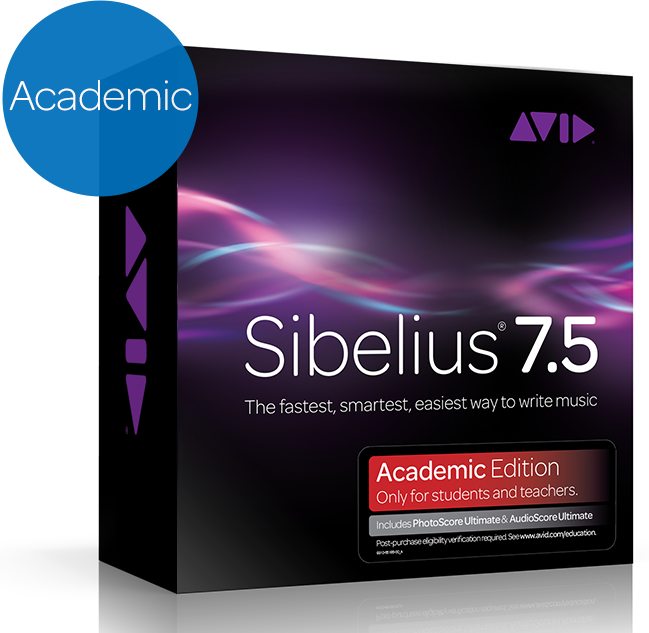
Značka: AVID
Kód produktu: 214698

AVID Sibelius 7.5 Academic + PhotoScore and AudioScore Bundle
AVID Sibelius 7.5 Academic + PhotoScore and AudioScore Bundle
Světově nejprodávanější hudební notačního software, vhodný pro hudebních skladatelů, vydavatelů, ale i pro studenty. Díky softwaru můžete zaznamenat svou kreativitu ve více směrech, než před tím. Sibelius 7.5 vám pomůže dosáhnout profesionálních výsledků a díky své jednoduchosti a uživatelské vstřícnosti nabízí jednoduchý způsob, jak co nejrychleji a nejjednodušeji zachytit váš tvůrčí proces. Verze Academic + PhotoScore and AudioScore Bundle obsahuje kromě softwaru Sibelius i 2x software na transkripci hudby z různých zdrojů a převod z jiného notového záznamu a je určena pro univerzity a studenty.
Špecifikácia
Sibelius 7.5
Windows:
- 32- or 64-bit Windows 7 (SP1 or later) or Windows 8 (not Windows RT)
- 1+ GB of RAM
- 750 MB hard disk space for Sibelius software only; 36 GB additional hard disk space for the Sibelius Sounds library (optional installation)
- DVD-ROM drive (box versions only)
Mac:
- Mac OS X 10.6.7, 10.7, 10.8, or 10.9
- 1+ GB of RAM
- 750 MB hard disk space for Sibelius software only; 36 GB additional hard disk space for the Sibelius Sounds library (optional installation)
- DVD-ROM drive (box versions only)
Doporučené požiadavky pre Sibelius Sounds knižnicu*
Windows:
- Intel Core 2 Duo or better (or equivalent)
- 4+ GB of RAM
- 40 GB hard disk space (SSD preferred)
- ASIO-compatible soundcard
Mac:
- Intel Core 2 Duo or better
- 4+ GB of RAM
- 40 GB hard disk space (SSD preferred)
* Sibelius Sounds môžete použiť aj keď váš počítač nespĺňa doporučené požiadavky, ale nebudete môcť použiť rovnaký počet zvukov súčasne a nahrávanie zvukov bude trvať dlhší čas.
AudioScore Ultimate 7
Windows:
- IBM-compatible Pentium IV (or equivalent AMD processor) or higher PC with at least 1 GB RAM
- Intel dual- or quad-core 2.66 GHz is recommended for best performance
- Windows XP/Vista/7
- DirectX version 8.1 or higher must be installed for recording from your microphone/sound card
- At least 200 MB available hard disk space (even more is recommended)
- (Optional) A microphone connected to your computer's microphone input or USB port
Mac:
- Apple Macintosh Intel with Mac OS X 10.5 or higher with at least 1 GB RAM
- Intel dual- or quad-core 2.66 GHz or better recommended for best performance
- At least 200 MB available hard disk space (even more is recommended)
- Apple Preview or Adobe Reader 6.0 or later for viewing AudioScore’s PDF help
- (Optional) A microphone connected to your computer's microphone input or USB port
PhotoScore Ultimate 7
Windows:
- IBM-compatible Pentium III (or equivalent AMD processor) or higher PC with at least 512 MB RAM
- Windows 2000/XP/Vista/7
- At least 40 MB available hard disk space (even more is recommended)
- Adobe Reader 6.0 or later for viewing PhotoScore’s PDF help
- A scanner (connected to your computer via a USB, Printer or SCSI port) and installed TWAIN or WIA driver software
Sibelius users note: Although PhotoScore will work with Sibelius 3 or later, it is recommended that you use Sibelius 5 or later, as it has greatly improved PhotoScore importing capabilities
Mac:
- Intel-powered Apple Mac with Mac OS X 10.4 or higher
- At least 512 MB RAM (even more recommended if you need to scan many small staves, or photos and graphics)
- At least 40 MB available hard disk space (even more is recommended)
- Apple Preview or Adobe Reader 6.0 or later for viewing PhotoScore’s PDF help
- Sibelius users note: Although PhotoScore will work with Sibelius 3 or later, It is recommended that you use Sibelius 5 or later as it has greatly improved PhotoScore importing capabilities.
- A scanner (connected to your computer via a USB, Printer or SCSI port), and installed Mac OS X TWAIN driver software
- It is highly recommended you visit your scanner manufacturer’s website and download the latest version of the driver software. You may need to contact your scanner manufacturer for information on installing a suitable TWAIN driver. If a Mac OS X TWAIN driver is not available for your scanner, you will need to scan using separate software, save suitable TIFF files, and open these in PhotoScore.

Dokumenty
Bezpečnostní pokyny
Příslušné bezpečnostní pokyny k výrobku nalezneš v návodu k použití.


