Albania
 Argentina
 Australia
 Austria
 Belgium
 Bosnia and Herzegovina
 Brazil
 Bulgaria
 Canada
 Chile
Chile
 Colombia
 Croatia
 Czech Republic
 Denmark
 Estonia
 Finland
 France
 Germany
 Greece
 Hungary
 Ireland
 Italy
Italy
 Latvia
 Lithuania
 Luxembourg
 Mexico
 Moldova
 Montenegro
 Netherlands
 New Zealand
 North Macedonia
 Norway
 Philippines
 Poland
 Portugal
 Romania
 Serbia
 Slovakia
 Slovenia
 South Africa
 Spain
Spain
 Sweden
 Switzerland
 Turkey
 Ukraine
 United Kingdom
 United States of America



Intercom Systems
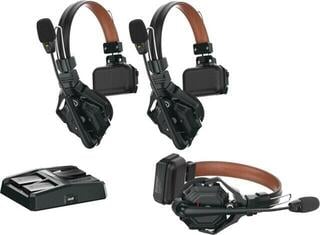
A wireless intercom allows production team members to talk to each other without a fixed communication cable. It is used at concerts, in theatres, during filming, at sporting events and in workplaces where people need to move while coordinating. Systems differ in the number of users, group communication method, headsets, power supply and ability to interface with an existing intercom. Before choosing, map out the communication groups and determine who needs to hear whom and who needs to talk to whom.
First map out who talks to whom
The director, camera, sound, lighting and stage crew do not necessarily need to be in one shared conversation at all times. Too many voices on one channel reduce intelligibility and can mask an important cue. Some teams need only one group, while others need separate communication lines and the ability for a supervisor to monitor multiple groups. Check whether the system supports the required roles and whether they can be changed directly during the event.
Distinguish between simultaneous hands-free talking, push-to-talk communication and systems where only a limited number of people can speak at a given time. Each method places different demands on team discipline and battery life. On a noisy stage, rapid microphone muting can be useful to prevent noise from being sent to the whole group.
Comparison of basic solutions
| Solution | Workplace advantage | What to watch out for |
|---|---|---|
| Standalone wireless headset units | Freedom of movement and easy team division | Battery life, charging and range in the specific space |
| Beltpack unit with headset | Controls worn on the body and the option to change headphones according to the system | Headset cable and connector compatibility |
| Base station with wireless users | Central management and possible interconnection of additional lines | Power supply, antenna placement and system capacity |
| Integration of wired and wireless intercom | Expansion of existing production infrastructure | Interface, levels, routing and galvanic isolation |
Check range along the actual route
The manufacturer's range specification is based on defined conditions. Walls, metal structures, the audience, stage equipment and other wireless systems can alter the result. Before the event, walk all working routes: backstage, corridors, the control room, entry points and the most distant point. It is not enough to test communication with an empty stage if the placement of people and equipment changes during production.
Place the base station or antennas according to the manufacturer's instructions, away from enclosed metal racks and obstacles that unnecessarily shield the signal. If the system allows channel selection or automatic coordination, configure it together with other wireless devices. Do not assess the intercom separately from microphones, instrument systems and wireless in-ear monitoring, which may operate in the same environment.
The headset affects intelligibility and comfort
A single-sided headset leaves one ear free to perceive what is happening, while a dual-sided headset better isolates speech from noisy surroundings. Position the boom microphone close to your mouth, but outside the direct airflow. In a noisy environment, a directional microphone and a more closed headset help; during a long shift, suitable clamping force, weight and the option to hygienically replace contact parts are equally important.
- Check whether the microphone can be quickly muted by raising the boom or using a button.
- Check the connector; a similar shape does not guarantee electrical compatibility.
- Set the volume for each team member so they can hear cues without unnecessarily overloading their hearing.
- For shared headsets, prepare cleanable or replaceable earpads.
- Route cables under clothing only so that they do not restrict movement or quick removal of the unit.
Batteries, charging and readiness
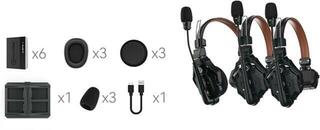
Battery life depends on talk mode, volume, battery condition and the operating environment. Plan according to the duration of both rehearsal and event, not just the programme itself. Label chargers, assign them a fixed location and check after finishing that all units are actually charging. With replaceable batteries, keep charged spares and clearly separate used ones from ready ones.
If the device supports powering during use, check whether the cable will restrict the worker and whether that mode is intended for operation. Check long-term stored units regularly according to the manufacturer's recommendation. Do not continue using a swollen, damaged or excessively heated battery.
Integration with production equipment
Some systems operate completely independently, while others connect to a wired intercom line, telephone interface or mixing console. Check the electrical interface type and signal direction; a simple mechanical adapter may not be sufficient. When connecting to a digital mixing console, create a separate communication path and prevent internal cues from inadvertently reaching the main sound system or recording.
A backup communication method is important for safety-related cues. This may be a wired station at a key position, agreed light signals or another procedure according to the type of event. A standard handheld wireless set is used to transmit a microphone to the sound system and does not replace a team intercom with two-way group communication.
Test before opening the venue
- Name the units according to work positions and set the groups.
- Check charging, headsets and microphone mute operation.
- Walk the actual routes and test locations behind walls and metal structures.
- Test simultaneous operation with other wireless equipment.
- Rehearse brief cues and the rule determining who has priority at a critical moment.
- Prepare a backup communication procedure for an outage.
Safe and clear team communication
An intercom works well when the technology is supported by clear rules. Use agreed names for positions, confirm important cues and do not clog the line with conversation unrelated to production. Secure the device so that it cannot catch on scenery, costume or moving equipment. Set the volume with headroom for noisy moments, not permanently at maximum.
When choosing, compare group capacity, actual mobility, headset comfort, charging method and integration options. Such a comparison will show whether the team can handle the entire shift, noisy backstage areas and movement into a distant corridor. Radio transmission will not work the same way in every building.