Albania
 Argentina
 Australia
 Austria
 Belgium
 Bosnia and Herzegovina
 Brazil
 Bulgaria
 Canada
 Chile
Chile
 Colombia
 Croatia
 Czech Republic
 Denmark
 Estonia
 Finland
 France
 Germany
 Greece
 Hungary
 Ireland
 Italy
Italy
 Latvia
 Lithuania
 Luxembourg
 Mexico
 Moldova
 Montenegro
 Netherlands
 New Zealand
 North Macedonia
 Norway
 Philippines
 Poland
 Portugal
 Romania
 Serbia
 Slovakia
 Slovenia
 South Africa
 Spain
Spain
 Sweden
 Switzerland
 Turkey
 Ukraine
 United Kingdom
 United States of America



Voice Processors
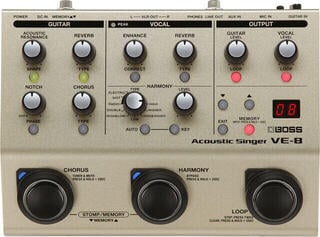
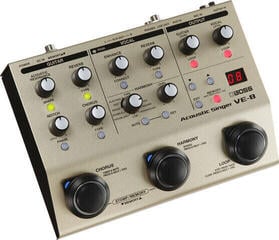
Vocal processors, vocoders and vocalizers process the voice in real time or in the studio signal chain. They can add harmonies, change pitch, shape tone, create a robotic character or combine the voice with another musical signal. Individual devices differ in their control method, inputs, number of effect blocks and whether they are intended more for the stage, studio or instrumental experimentation. When choosing, start with the effect you need, then compare the number of features.
The difference between three approaches
Vocal processor is a broader term for a device that processes a microphone signal. It can include equalization, dynamics processing, spatial effects, pitch correction and voice layering. A vocoder works with two components: it transfers the character of speech or singing onto a carrier musical signal, often from a synthesizer. A vocalizer or harmonizer creates additional voices according to the sung melody and specified harmonic context.
| Type | Usage character | What it needs for control |
|---|---|---|
| Vocal processor | Processing and combining effects for one voice | Microphone, set level and often footswitching |
| Vocoder | Synthetic voice created by combining speech and a carrier signal | Modulator and carrier signal, optionally a keyboard or MIDI |
| Vocalizer | Adding backing vocals to the main melody | Chord, key or connected instrument information |
| Studio signal processor | Processing during recording or mixing | Suitable level, routing and monitoring |
Connecting the microphone and setting the input
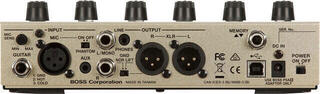
First check what microphone input the device offers and whether it provides the power required for your microphone. Set the input sensitivity during the loudest singing so that the signal remains clean and has headroom. Too low a level emphasizes the noise of subsequent stages, while too high a level causes distortion before the effect. When connecting to a mixing console, distinguish between microphone and line level.
On stage, route the processed output to a suitable channel of the mixing console. If you send both a clean and processed signal to the sound engineer, agree on routing and cable labeling. Two paths of the same voice can create phase problems or unclear sound if mixed incorrectly. Before the soundcheck, save a basic setting without extreme effects as a safe starting point.
Harmonies must know the musical context
Backing voices fit the arrangement more easily when the device knows the song's chords or key. Some processors accept an instrument input, others MIDI or a manually set scale. If the harmony changes unexpectedly in a song, a fixed key can create unsuitable notes. For more complex arrangements, prepare changes in advance and save them into individual scenes or presets if the device allows it.
- A single added third sounds different from widely spread multipart harmony.
- Higher voices tend to be more prominent, so monitor their level in the entire mix.
- Artificial doubling can thicken the vocal without creating separate harmony.
- Set pitch correction according to the genre; fast response is a pronounced effect, while slower response can be more subtle.
- Try harmonies with music, not only with a solo microphone.
A vocoder needs two intelligible signals
Speech or singing forms the modulator signal, from which the vocoder takes rhythm and articulation. The carrier signal supplies pitch and harmonic content. A richer carrier sound generally gives the vocoder more material to process, but the result is also affected by pronunciation, input sensitivity and the device's number of bands. If the words are unintelligible, adjust the source and level first, then add further effects.
A vocoder can be a standalone processor, part of a keyboard instrument or a software tool. A hardware solution is controlled directly and integrates more easily into a stage setup. The software version offers detailed automation, but requires a suitable audio interface, routing in recording software and latency control.
Control during a performance
A singer needs to change scenes without letting go of the microphone. Footswitches, pedals and clearly ordered presets are therefore often more valuable at a concert than an effect that you switch on once per evening. Buttons and the display must remain readable even in poor light. If you use the device on a table, secure the cables so that movement does not strain the connectors.
In the monitor path, leave yourself enough effect to sing comfortably, while still hearing your intonation and articulation. With wireless monitoring, wireless in-ear monitoring can be useful; before the concert, however, check the entire path including levels and any latency. Address feedback through microphone and monitor placement and appropriate gain, not only with a gate or equalizer in the processor.
Preparing a preset for a song
- Set a clean input signal and the correct sensitivity.
- Select the main effect and turn off blocks you do not need.
- Add harmonies or a carrier signal and verify the musical context.
- Match the levels of the enabled and disabled preset.
- Save the scene under a name you will recognize quickly on stage.
- Test switching in the order of the complete set.
Studio and recording
When recording, decide whether you want to record the effect permanently or keep a clean track for later editing. A safe approach is to record a clean voice and monitor the processing only while singing, or record both outputs separately. If the performer's delivery is closely linked to a vocoder or hard correction, capturing the processed signal can be a creative part of the arrangement.
For further processing, the effects and signal processors category may also be useful. With hardware, pay attention to the inputs, controls and the certainty with which you can recall a saved preset. Fine-tune the settings for the specific song, with the microphone and sound system used. The effect name alone does not reveal whether it will support the voice or mask it in the mix.