Albania
 Argentina
 Australia
 Austria
 Belgium
 Bosnia and Herzegovina
 Brazil
 Bulgaria
 Canada
 Chile
Chile
 Colombia
 Croatia
 Czech Republic
 Denmark
 Estonia
 Finland
 France
 Germany
 Greece
 Hungary
 Ireland
 Italy
Italy
 Latvia
 Lithuania
 Luxembourg
 Mexico
 Moldova
 Montenegro
 Netherlands
 New Zealand
 North Macedonia
 Norway
 Philippines
 Poland
 Portugal
 Romania
 Serbia
 Slovakia
 Slovenia
 South Africa
 Spain
Spain
 Sweden
 Switzerland
 Turkey
 Ukraine
 United Kingdom
 United States of America



Dynamic Processors
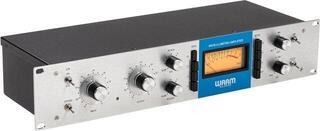
Dynamic processors adjust the difference between quiet and loud parts of a microphone, instrument or line-level signal. They help keep vocals, bass guitar or an entire mix at a usable level, reduce unwanted bleed and protect subsequent parts of the audio system from unexpected peaks. They solve different problems in recording, mixing and live sound, so start your selection with the specific task, number of channels and insertion point. It is not only about volume: threshold, attack and release settings can retain a natural performance or deliberately emphasise the character of the sound.
Which type of processing do you need
A compressor reduces dynamic range after a signal exceeds a set level. Vocals can remain more intelligible, bass guitar more even, and individual drum hits can sit better in the mix. A limiter works more strictly and is used mainly where you do not want peaks to exceed a defined limit. A gate, by contrast, attenuates or closes a channel when the signal falls below the threshold; it can reduce bleed between drums or noise during pauses, but overly aggressive settings cut off quiet word endings and note decays.
An expander is a gentler alternative to a gate. Instead of closing completely, it lowers the level of quieter passages, so the result often sounds more natural. A de-esser targets pronounced sibilance in vocals, and some processors combine several of these functions in one unit. If you are also looking for equalisation, modulation or other processing, explore the broader range of effects and signal processors.
Standalone unit or processing in a mixer
A hardware processor makes sense in a setup where you want physical controls, a permanent connection or independent processing before another device. In a digital mixer, dynamics processing is often available on multiple inputs without additional cabling; however, check the capabilities of the specific model. When recording through a computer, a software plug-in can perform a similar role. What matters is whether you need to intervene at the input, during a live broadcast, or only when editing a recording.
Comparison of basic functions
| Function | What it does | Typical use | Risk of incorrect settings |
|---|---|---|---|
| Compressor | Gradually attenuates the signal above the threshold | Vocals, bass, drums, channel group | Loss of natural dynamics and audible “pumping” |
| Limiter | Prevents peaks from exceeding the set level | Signal-chain protection, handling short peaks | Distortion or an unnaturally compressed result |
| Gate | Attenuates a channel below the set threshold | Reducing noise and bleed | Cut-off note attacks or decays |
| Expander | Reduces quieter passages more smoothly | Gentler cleanup of speech and instruments | Unstable level with an unsuitable threshold and release |
| De-esser | Attenuates the problematic part of the spectrum during sibilance | Vocals and speech | Unclear diction with heavy processing |
Controls that affect the result
The threshold determines when the processor starts working, while the ratio indicates how strongly it intervenes. Attack determines whether the initial transient of a note remains punchy or becomes softened. Release sets the return of processing after the signal level drops. Automatic mode is useful as a quick starting point. Manual controls, however, allow more precise response to a particular voice or instrument.
- Sidechain input: lets you trigger compression with another signal or focus detection on a certain part of the spectrum.
- Channel linking: helps prevent the left and right sides from changing differently in stereo.
- Level metering: a gain-reduction indicator shows how much the processor is currently reducing.
- Bypass: a quick comparison of processed and unprocessed signal reveals whether higher output volume has misled you.
- Make-up gain: restores level after compression; it is not a substitute for correctly setting the input.
Connection in the studio and on stage
A standalone processor can be inserted via a mixer channel insert, placed between a preamp and converter, or used on a group or main bus. Before connecting it, check the signal level and connector type on both devices. Balanced cabling helps reduce interference over longer runs, but it does not solve unsuitable gain settings by itself. You can find mixers commonly combined with processors among mixing consoles; for computer recording, an audio interface is also an important link.
First set up a clean signal path without dynamic processing. Then lower the threshold until the processor responds at the desired points, and compare with bypass at a similar perceived volume. On stage, leave headroom for louder performances during the concert. In the studio, it is wise to record conservatively: excessively strong compression printed directly to the track cannot be undone later.
Practical choices by setup
- For one voice or instrument, consider a single-channel solution with clear metering.
- For a stereo source, choose a pair of channels that can be linked.
- For drums or multiple microphones, count the channels and check whether you need a gate and compressor at the same time.
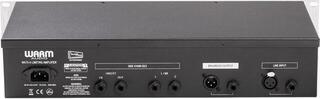
- If you transport the unit, check its dimensions, power supply, mounting type and connector access in the rack.
- Draw the order of devices before buying. A simple diagram quickly reveals a missing insert, cable or level mismatch.
Control without losing musicality
Mono, stereo and multiple channels
A single-channel processor is sufficient for one microphone or instrument. A dual-channel unit can process two independent sources, but for stereo material look for the option to link channel control. Without it, a loud peak on only one side can change their relative balance and shift the perceived stereo image. A multichannel solution is useful for drums or a permanently connected setup; check in advance which controls and detector circuits are shared between channels.
Recallable settings and digital control make it easier to return to a programme, while a fully analogue panel shows control positions without navigating menus. Neither design is automatically more suitable. If you work with different bands, you will appreciate quick recall of settings; with one permanently connected source, immediate physical control and easy bypass comparison may be more important.
Dynamics are not a fault that needs to be removed. In vocals they carry emotion, in drums impact, and in acoustic instruments the character of performance. Set the processor according to the context of the entire mix, not only an isolated track. If the signal sounds harsh, breathes or loses the beginning of notes, reduce the amount of processing and adjust the time parameters.
Before choosing, identify one main problem: uneven performance, short peaks, noise in pauses or sibilance. Select the function according to it, and only then consider channel count or control method. Only then address channel count and control. The signal path will remain clear and the processor will perform exactly the task for which you insert it.