Albania
 Argentina
 Australia
 Austria
 Belgium
 Bosnia and Herzegovina
 Brazil
 Bulgaria
 Canada
 Chile
Chile
 Colombia
 Croatia
 Czech Republic
 Denmark
 Estonia
 Finland
 France
 Germany
 Greece
 Hungary
 Ireland
 Italy
Italy
 Latvia
 Lithuania
 Luxembourg
 Mexico
 Moldova
 Montenegro
 Netherlands
 New Zealand
 North Macedonia
 Norway
 Philippines
 Poland
 Portugal
 Romania
 Serbia
 Slovakia
 Slovenia
 South Africa
 Spain
Spain
 Sweden
 Switzerland
 Turkey
 Ukraine
 United Kingdom
 United States of America



DSP Audio Systems
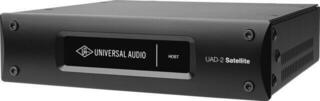
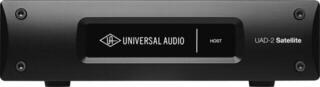
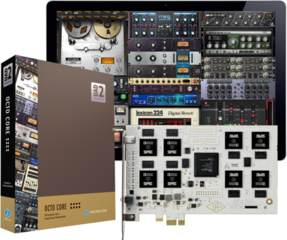
DSP audio systems use a digital signal processor for calculations associated with audio processing and can relieve the main processor of a studio computer. In this category, you will mainly encounter external accelerators for supported plug-ins and integrated recording systems, so these are not interchangeable devices. Solutions associated with this category include Universal Audio UAD-2 Satellite in QUAD and OCTO variants and Avid Pro Tools Carbon; verify current category placement on the product pages. Compatibility with software, operating system, computer port and the way you want to record or mix is decisive.
Accelerator or complete recording system
A DSP accelerator adds dedicated computing power for the plug-ins of its supported system. In a larger project, you can therefore move part of the processing outside the computer's processor. This does not mean it will speed up any studio program or every plug-in; its benefit is tied to a specific platform and licences.
An integrated audio system can combine audio conversion, inputs and outputs, monitoring and DSP processing in one workflow. Therefore, do not assess Pro Tools Carbon merely as “extra performance”. First clarify whether you also need an audio interface and whether you work in a supported Pro Tools environment.
Practical comparison
| Solution | Main role | Verify before buying |
|---|---|---|
| External DSP accelerator | Processing supported effects and processors during mixing | Plug-in platform, licences, port and system support |
| Integrated DSP recording system | Recording, conversion, monitoring and processing in one workflow | Number of required inputs and outputs, software, drivers and expansion |
| Standard audio interface | Audio input and output without dependence on a separate DSP platform | Connectivity, workflow latency and required channels |
| Native processing on a computer | The main processor calculates the plug-ins | Load of existing projects and options for freezing or exporting tracks |
Compatibility first, then the number of cores
The QUAD and OCTO labels indicate different numbers of DSP cores; more cores provide greater computing capacity within the supported system. The name alone, however, will not tell you how many particular plug-ins you can run. The demands of individual processors differ, and sample rate or signal-routing method may also play a role.
- Check the officially supported versions of the operating system and studio software.
- Verify that your licences include the processors you want to use.
- Make sure the computer has the correct port type; the same connector shape does not necessarily mean the same protocol.
- Find out whether the device will work with your existing generation of hardware and software.
- Before updating the system, check driver availability and the manufacturer's recommended procedure.
USB and Thunderbolt
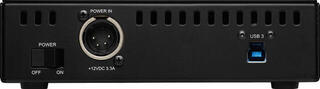
Individual versions connect via USB or Thunderbolt 3. Choose according to the exact interface of the specific version, not only a photo of the connector. An adapter may not carry all functions or provide a supported configuration. If you are building a studio around USB connectivity, you can also compare USB audio interfaces; the audio interfaces category offers a broader overview.
Look at the project that is already slowing your computer down
Before deciding, open a typical mix and see where the limitation arises. If the computer processor handles the project but you lack inputs, a DSP accelerator alone will not solve the problem. Conversely, if you regularly hit the limit of supported plug-ins, comparing core counts and connection methods already has practical meaning.
A simple inventory helps: track count, the processors used most often, real-time work and the stage at which the project slows down. Some tasks can be addressed by freezing tracks or rendering effects. Hardware DSP makes sense when its workflow suits your pace and the software you use.
Recording and monitoring
When recording, what the performer hears in headphones and how the signal returns from software are important. Integrated systems may offer their own DSP monitoring method, but setup depends on the specific platform. Verify routing, number of headphone paths and effect support during recording. If you only need to expand distribution to multiple headphones, standalone headphone amplifiers address a different, narrower task.
When mixing, in turn, watch what happens after disconnecting the hardware. A project dependent on DSP may not open all processors in full form without the connected device or authorization. This matters when moving between studios, archiving and collaborating remotely.
Software, licences and longer-term system viability
Hardware and software form one system. Before purchase, read the conditions for registration, licence transfer and updates. Also find out which plug-ins are included with the product and which are acquired separately; without verification, a specific bundle cannot be assumed. You can find further tools for production and mixing in the studio software category, but their DSP compatibility must be assessed individually.
Six checks before choosing
- Name the problem: insufficient computing power, inputs, outputs or convenient monitoring.
- List the operating system, recording software and plug-in versions.
- Verify the computer's exact port and protocol.
- Compare QUAD and OCTO according to the load of the processors you actually use, not only the core count.
- Check licences, registration and project behaviour without connected hardware.
- Plan cables, power and a location with sufficient ventilation according to the manual.
Choose a DSP system as part of the complete workflow. When the platform, connection and working method align, dedicated processing can relieve the computer on projects with many tracks and effects; without that alignment, part of its potential would remain unused.